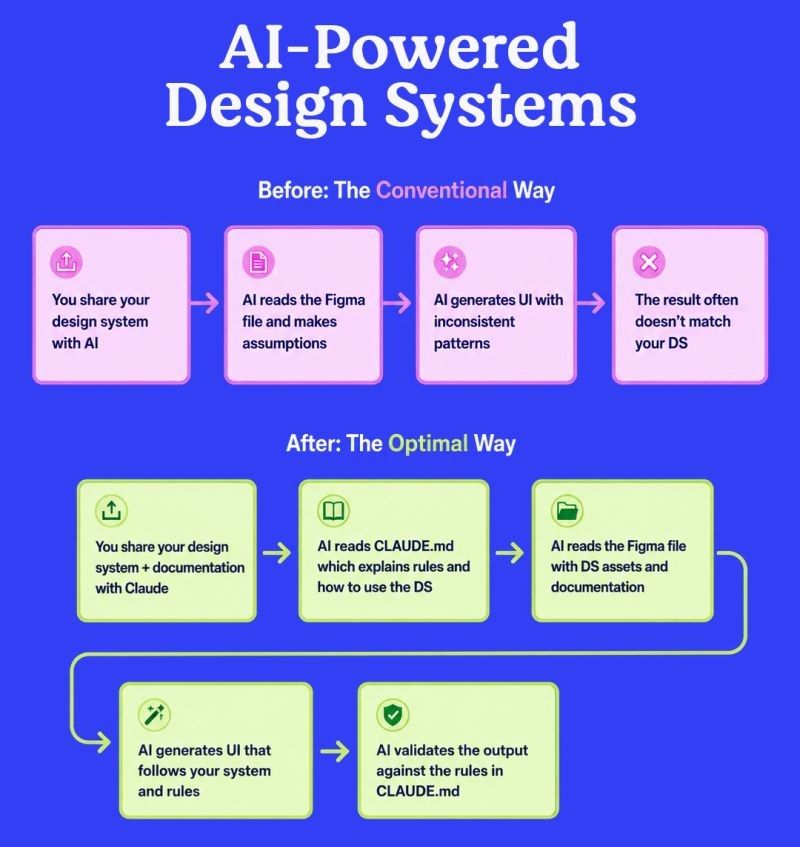
𝟱 𝘄𝗮𝘆𝘀 𝘁𝗼 𝗺𝗮𝗸𝗲 𝘆𝗼𝘂𝗿 𝗱𝗲𝘀𝗶𝗴𝗻 𝘀𝘆𝘀𝘁𝗲𝗺 𝗔𝗜-𝗿𝗲𝗮𝗱𝘆
AI can generate interfaces quickly, but the quality of the result depends on the quality of the design system behind it.
A structured, documented, and regularly maintained design system gives AI clear rules to follow instead of forcing it to make assumptions.
Here are five practical ways to prepare your Figma design system for AI workflows:
🧹 𝟭. 𝗖𝗹𝗲𝗮𝗻 𝗮𝗻𝗱 𝗮𝘂𝗱𝗶𝘁 𝘆𝗼𝘂𝗿 𝗱𝗲𝘀𝗶𝗴𝗻 𝘀𝘆𝘀𝘁𝗲𝗺
Before using your design system as an AI reference, review its foundations, components, variables, and examples.
Look for:
🔹 Duplicate or outdated components
🔹 Hardcoded colors, spacing, or typography
🔹 Detached instances
🔹 Inconsistent naming
🔹 Incorrect component usage
AI can reproduce existing inconsistencies, so cleaning the system first is essential.
📚 𝟮. 𝗗𝗼𝗰𝘂𝗺𝗲𝗻𝘁 𝗰𝗼𝗺𝗽𝗼𝗻𝗲𝗻𝘁𝘀 𝗮𝗻𝗱 𝘀𝘁𝘆𝗹𝗲𝘀
Do not rely only on component names. Explain how and when each element should be used.
Your documentation can include:
🔹 Component purpose
🔹 Variants and states
🔹 Content rules
🔹 Accessibility requirements
🔹 Correct and incorrect usage examples
Good documentation helps AI understand the logic behind the interface, not only its visual appearance.
🛠️ 𝟯. 𝗨𝘀𝗲 𝗰𝗼𝗻𝘀𝗶𝘀𝘁𝗲𝗻𝘁 𝘀𝘁𝗿𝘂𝗰𝘁𝘂𝗿𝗲𝘀 𝗮𝗻𝗱 𝗻𝗮𝗺𝗶𝗻𝗴
Organize layers, components, variants, and variables using predictable naming conventions.
For example:
𝑩𝒖𝒕𝒕𝒐𝒏 / 𝑷𝒓𝒊𝒎𝒂𝒓𝒚 / 𝑳𝒂𝒓𝒈𝒆 / 𝑫𝒆𝒇𝒂𝒖𝒍𝒕
Clear structures make it easier for designers and AI tools to find and apply the correct design elements.
🧠 4. 𝗗𝗲𝗳𝗶𝗻𝗲 𝘆𝗼𝘂𝗿 𝗺𝗮𝗶𝗻 𝗿𝘂𝗹𝗲𝘀 𝗶𝗻 𝗮 𝗠𝗮𝗿𝗸𝗱𝗼𝘄𝗻 𝗳𝗶𝗹𝗲
Create a project guidance file such as CLAUDE.md to describe the principles AI should follow.
Include rules related to:
🔹 Brand colors
🔹 Typography hierarchy
🔹 Spacing and layout
🔹 Component selection
🔹 Responsive behavior
🔹 Interaction patterns
🔹 Accessibility
This file acts as a practical onboarding guide for AI.
🔄 𝟱. 𝗦𝘆𝗻𝗰𝗵𝗿𝗼𝗻𝗶𝘇𝗲 𝗮𝗻𝗱 𝘃𝗮𝗹𝗶𝗱𝗮𝘁𝗲 𝗰𝗼𝗻𝘁𝗶𝗻𝘂𝗼𝘂𝘀𝗹𝘆
Your design system will evolve, so AI should always work with the latest version.
A reliable workflow should:
🔹 Retrieve updated Figma assets
🔹 Detect deprecated components
🔹 Check variables and tokens
🔹 Identify design-system drift
🔹 Validate generated interfaces before delivery
A good AI workflow is not only about generating screens faster.
It is about generating interfaces that remain consistent, reusable,
and aligned with the product.